Shopify vs Squarespace for Brands That Sell Seriously
E-commerce, Shopify
Nov, 26 2026
Shopify vs Squarespace for Brands That Sell Seriously
Shopify vs Squarespace is an easy question when you are launching a store and a hard one when the store already makes real money. Squarespace is an excellent starting point: clean templates, an intuitive editor and enough ecommerce features to get a brand selling without a development team.
The question changes once sales become serious. A growing catalog, several stock locations, subscriptions or B2B pricing, international markets and tools the platform does not offer all push against Squarespace’s limits. This comparison is for brands that already sell on Squarespace and are deciding whether to switch from Squarespace to Shopify. It covers the differences that matter at volume, the real cost at three revenue levels, the signs it is time to move, and what a migration involves.
The short answer
Choose Shopify when product sales are the core of the business and growth depends on variants, inventory locations, apps, international selling, subscriptions or B2B. Choose Squarespace when the site is design-led or content-led and the catalog is light.
The usual reasons a brand outgrows Squarespace are catalog limits, operational friction and missing integrations, not design. The switch is rarely about the plan price. The real cost is workarounds, lost conversion and an operational ceiling.
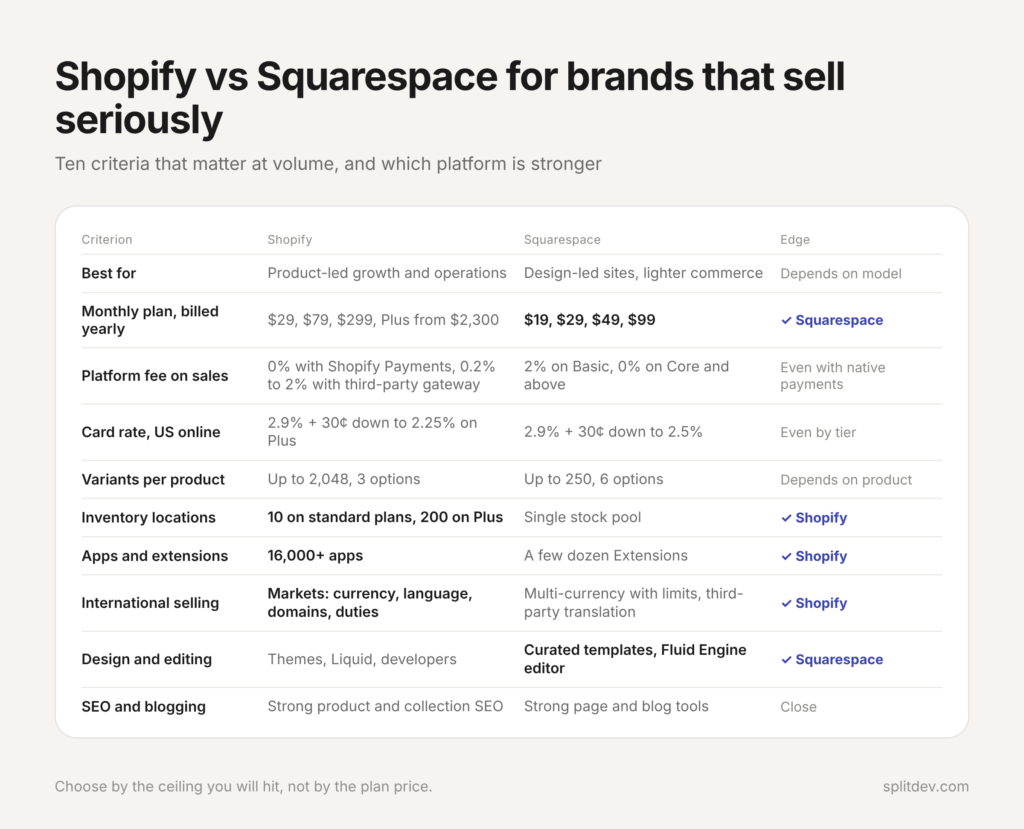
Shopify vs Squarespace at a glance
The Edge column shows which platform is stronger for a brand that sells seriously.
Criterion
Shopify
Squarespace
Edge
Best for
Product-led growth and operations
Design-led sites with lighter commerce
Depends on model
Monthly plan (billed yearly)
Basic $29, Grow $79, Advanced $299, Plus from $2,300
Basic $19, Core $29, Plus $49, Advanced $99
Squarespace
Platform fee on sales
0% with Shopify Payments, 0.2% to 2% with a third-party gateway
2% on Basic, 0% on Core and above
Even with native payments
Card rate (US, online)
2.9% + 30¢ on Basic, 2.7% Grow, 2.5% Advanced, 2.25% Plus
2.9% + 30¢ on Basic and Core, 2.7% Plus, 2.5% Advanced
Multi-currency checkout with limits, translation through third parties
Shopify
Design and editing
Themes, Liquid, developers
Curated templates, Fluid Engine editor
Squarespace for ease
SEO and blogging
Strong product and collection SEO
Strong page and blog tools
Close
Squarespace vs Shopify feature by feature
Ecommerce features and catalog limits
Both platforms advertise unlimited products on paper, but Squarespace 7.1 holds up to 10,000. The differences show up in variants, inventory and total catalog size.
Shopify allows up to 2,048 variants per product across three options, a limit raised from 100 in October 2025. Media is capped at 250 files per product, and some older themes and apps still do not support more than 100 variants, so check yours first. Inventory can be tracked across 10 locations on the standard plans and 200 on Plus. B2B catalogs (up to three on standard plans, unlimited on Plus) and combined listings are built in.
Squarespace allows six options per product but caps a product at 250 variants. Stock is a single pool per variant, and a version 7.1 site holds up to 10,000 products. A brand with a few sizes and colors will never notice. An apparel brand with sizes, colors, fits and several warehouses will.
The platforms trade limits: Squarespace allows more options, Shopify allows far more combinations. If your products have four or more attributes, plan how they will be modeled on Shopify before you decide.
Point of sale exists on both. Shopify’s is more mature and tied to online inventory and customer data. Squarespace’s in-person selling has shallower inventory and reporting.
Multichannel selling follows the same pattern. Shopify manages products, inventory and orders from one admin across the online store, POS, marketplaces and social channels such as Google, Meta and TikTok. Squarespace connects to a smaller set, such as Google Shopping and social selling, and marketplace sync usually needs a third-party tool or manual uploads.
Payments and checkout
Shopify Payments is the native processor, with online card rates from 2.9% + 30¢ on Basic to 2.25% + 30¢ on Plus. Squarespace charges 2.9% + 30¢ on Basic and Core, 2.7% on Plus and 2.5% on Advanced.
At comparable tiers the card rates are the same, so Shopify does not win on processing rates. The difference is in gateways and checkout.
Squarespace runs on its own Squarespace Payments plus a short list of connected options such as Stripe, PayPal and Square. Shopify supports Shopify Payments and a long list of third-party gateways. That matters if you need a regional processor or an existing merchant account, though a third-party gateway adds the surcharge covered in the fees section below.
Checkout is the second gap. Shop Pay, Shopify’s accelerated checkout for returning buyers, has no direct Squarespace equivalent, although Squarespace offers wallet options such as Apple Pay and Google Pay. On Plus you can also customize checkout logic, while Squarespace’s checkout is clean but more fixed.
Apps and extensions
This is one of the largest practical gaps. The Shopify App Store lists more than 16,000 apps, and nearly every operational need has several mature options: subscriptions, loyalty, bundling, ERP sync, shipping, reviews.
Squarespace Extensions number in the dozens. They cover shipping, tax, print on demand and marketing, but complex workflows often need manual processes or custom code.
Design, templates and editing
Squarespace still leads on speed and polish for non-developers. A marketer can build and rearrange a page without help, which suits a team that edits the site every week.
Shopify themes have improved a lot with section-based editing, and customization through Liquid and developers goes deeper. Larger structural changes are done once by a developer and then maintained in the theme editor. For a brand with a strong visual identity that needs a more capable backend, the design gap is smaller than it was. We build Shopify design that keeps your brand look through a migration.
SEO and blogging
Both platforms give you clean URLs, meta controls, sitemaps and structured data. Squarespace feels stronger for content-heavy sites. Shopify is stronger for product and collection SEO at scale and gives you more flexible redirect management. In a migration, rankings depend on redirects and content parity, not on the platform.
Support
Shopify offers live chat on Basic and Grow, enhanced live chat on Advanced and priority support on Plus. Squarespace supports customers through live chat and email, and its plan page lists current hours for your region. On both, response depth tracks the plan and the complexity of the issue.
For a store with custom code or several integrations, neither vendor’s support covers your own setup. Budget for a development partner who knows the store, whichever platform you choose.
Shopify vs Squarespace fees once you are doing real volume
Plan prices and transaction fees
Plan prices are in the table above. Two fees matter beyond them.
Squarespace Basic charges 2% on every online sale, so it is the most expensive plan for any store with real sales: $400 a month at $20,000 in revenue. Stores that sell seriously belong on Core or higher, where the platform fee is 0%.
Shopify charges no platform fee with Shopify Payments. With a third-party gateway it adds 2% on Basic, 1% on Grow, 0.6% on Advanced and 0.2% on Plus. Brands that use another processor should price this in.
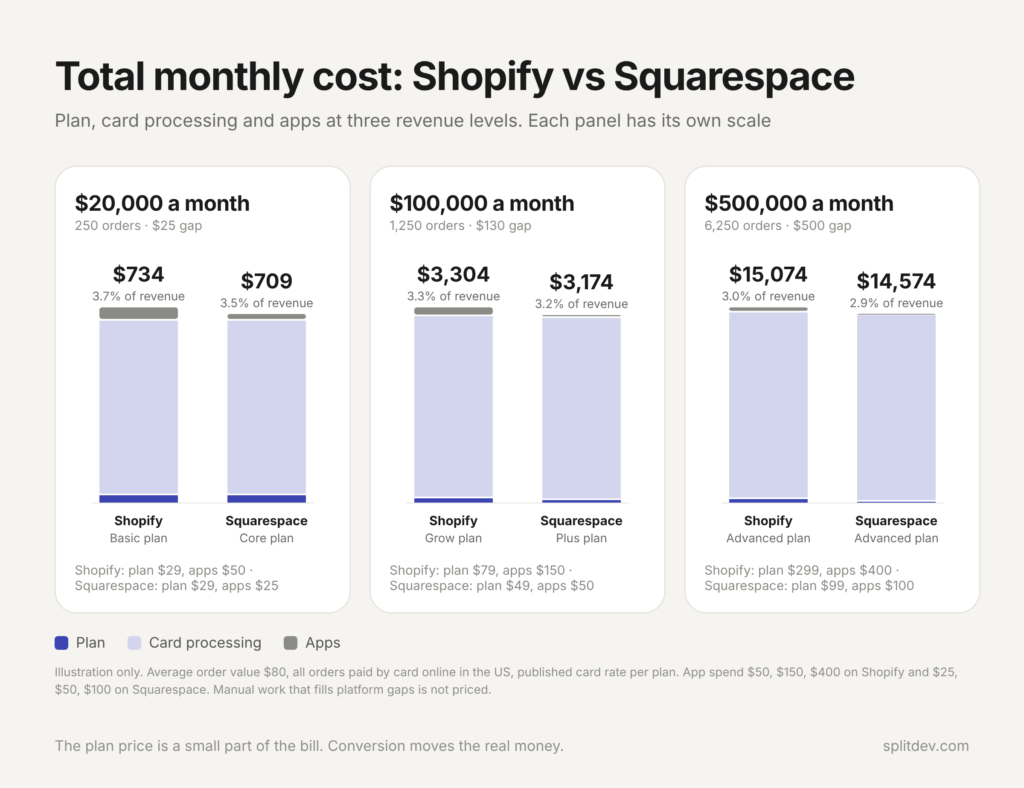
The total cost at $20k, $100k and $500k a month
Total cost of ownership adds processing and apps to the plan price. This is an illustration only.
Assumptions: average order value $80, all orders paid by card online in the US, the published card rate for each plan, and an assumed app spend of $50, $150 and $400 a month on Shopify and $25, $50 and $100 on Squarespace. The Squarespace figure is lower because there are fewer Extensions to buy. It does not price the manual work that fills the gaps.
Monthly revenue
Orders
Shopify plan
Shopify total
Squarespace plan
Squarespace total
$20,000
250
Basic, $29
$734 (3.7%)
Core, $29
$709 (3.5%)
$100,000
1,250
Grow, $79
$3,304 (3.3%)
Plus, $49
$3,174 (3.2%)
$500,000
6,250
Advanced, $299
$15,074 (3.0%)
Advanced, $99
$14,574 (2.9%)
Squarespace is cheaper at every level, by $25, $130 and $500 a month. The gap is small next to what conversion is worth: a 1% relative change in conversion moves monthly revenue by $200, $1,000 and $5,000 at these levels. A platform that removes a conversion blocker, a stock error or a manual process pays for itself. One that does not, will not, whatever its price.
The case for switching is fewer ceilings. Cheaper fees are not part of it. If your catalog, inventory and markets fit inside Squarespace, staying is the rational choice.
Where Shopify is the better fit
Shopify is the stronger choice when:
Online sales are the main revenue line and the store is the core of the business.
Products carry several attributes, such as size, color and fit, or stock sits in more than one location.
You sell, or plan to sell, in several countries with local currencies, languages and domains.
Subscriptions, bundles or wholesale accounts are a real share of orders.
The business depends on integrations such as ERP, loyalty, shipping or marketplace sync.
If two or three of these describe your brand, the next sections show where Squarespace starts to cost you.
Where Squarespace still makes sense
Squarespace is the right choice when:
The goal is a highly designed brand or content site with a modest catalog.
Catalog complexity is low: few variants and a single stock location.
International selling, subscriptions and B2B are secondary or absent.
The team wants an all-in-one environment without managing an app stack.
Portfolio, membership and early-stage product brands can stay on Squarespace profitably for years. Moving too early adds cost and risk without adding revenue.
Squarespace ecommerce limitations: where it starts to hold you back
Catalog, variants and inventory
The 250-variant ceiling and the single stock pool become operational problems when products carry several attributes or stock sits in more than one place. The usual workaround is splitting one product into several listings, which fragments inventory reporting and makes customers hunt across pages for one item. Shopify allows up to 2,048 variants per product against Squarespace’s 250, and tracks stock by location. One caveat: it caps products at three options.
Subscriptions, B2B and bundles
Shopify has mature subscription tools, company accounts, payment terms and bundling. Squarespace handles basic offers, but complex recurring or wholesale models hit friction quickly.
International selling
Shopify Markets gives native control over currencies, languages, domains or subfolders, market-specific pricing and duties estimation. Squarespace supports multi-currency checkout with more limits around subscriptions and digital products, and translation leans on third-party tools.
Star Pro Combat shows what that looks like. The brand runs US, UK and EU storefronts with multi-currency pricing, and reported a 48% conversion lift and 63% higher revenue per visitor after the rebuild.
Apps and integrations
When the tool you need is not a Squarespace Extension, the options are custom development, manual processes or going without. For ERP sync, advanced loyalty or marketplace connections, Shopify almost always has a ready solution.
6 signs it’s time to switch
Switch when two or more of these apply:
You regularly hit or work around the 250-variant limit, or you need multi-location inventory.
Subscriptions, bundles or B2B pricing are becoming meaningful revenue and feel constrained.
International sales are growing and you need multi-currency, localized storefronts or duties handling.
Critical tools such as ERP, advanced loyalty or marketplace sync are missing or need painful workarounds.
Conversion or operational speed lags because of platform limits, not traffic or product issues.
The time and cost of workarounds exceed the cost of a clean migration.
If two or more apply, the switch deserves a serious cost estimate. Run the math above with your own revenue and your own workaround hours.
Moving from Squarespace to Shopify: what transfers and what doesn’t
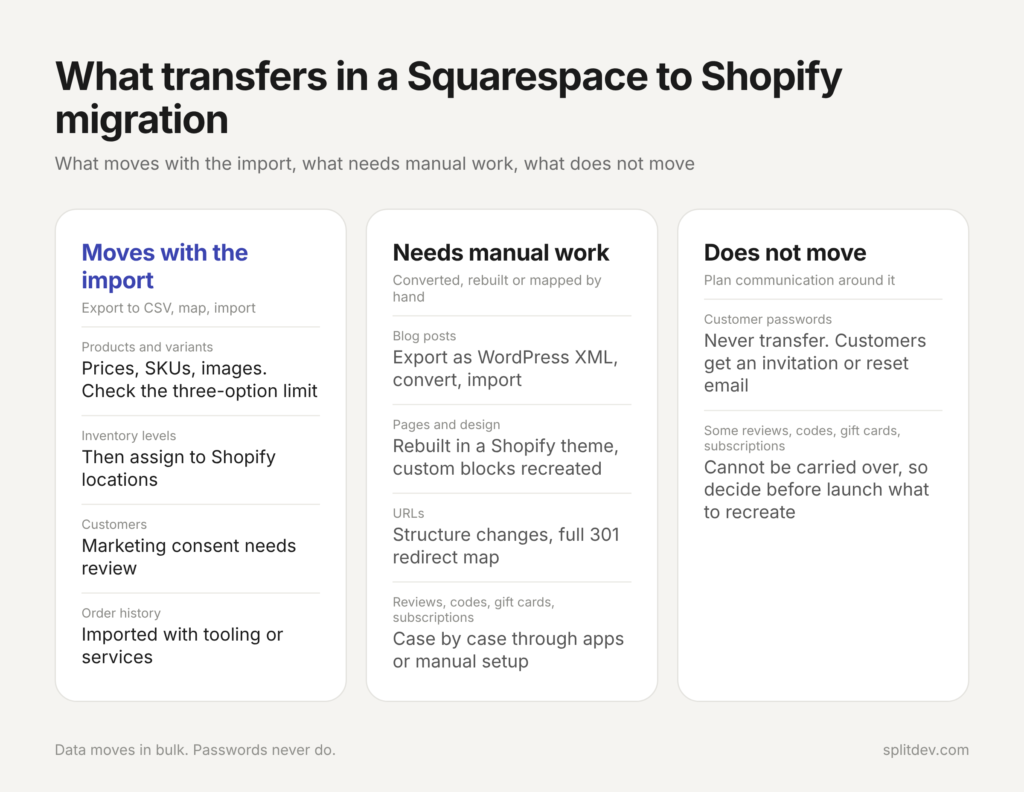
A migration has three kinds of content: what moves automatically, what moves with manual work, and what does not move. Our Squarespace migration service plans around that split.
Content
What happens
Products, variants, prices, SKUs, images
Export to CSV, map and import into Shopify. Check variant structure against Shopify’s three-option limit and check that images are attached to the right variants.
Inventory levels
Move with product data, then assign to Shopify locations.
Customers
Export and import. Marketing consent needs review.
Order history
Imported with tooling or services so support and returns continuity is preserved.
Blog posts
Export in WordPress XML format, then convert and import.
Pages and design
Rebuilt in a Shopify theme, not transferred one to one. Galleries, custom blocks and code are recreated by hand.
URLs
Structure changes, so a full 301 redirect map is required.
Customer passwords
Never transfer. Customers get an invitation or reset email.
Reviews, discount codes, gift cards, subscriptions
Handled case by case through apps or manual setup. Some cannot move.
Products, customers and orders
Product data moves through CSV with a mapping step, and the variant structure is the part that needs a decision. Plan an email to customers, since passwords cannot move and everyone has to activate or reset their account.
Blog, pages and URL redirects
Shopify uses /products/, /collections/, /pages/ and /blogs/ paths, so almost every URL changes. Every old URL that ranks or earns links needs a one-to-one destination.
Keeping your rankings
A well-executed migration preserves organic traffic. The critical elements are:
A one-to-one 301 redirect for every important URL
Content and meta parity between old and new pages
Correct internal links and structured data
Search Console and analytics monitoring through the transition
Woodies Clothing moved from WooCommerce to Shopify in five weeks, kept its SEO positions and reported a 29% conversion lift. The source platform was different, but the redirect process is the same one we use for Squarespace stores. We describe it in how we keep rankings during a migration.
How long a migration takes and what it costs
Timeline and cost depend on catalog size and variant complexity, how custom the design is, and how many integrations and markets are involved.
Level
Typical scope
Timeline
Cost range
Simple
Up to a few hundred products, simple variants, an adapted theme, no custom features
2 to 4 weeks
$4,000 to $8,000
Mid-size
Larger catalog, custom theme, redirect mapping, several app replacements, blog migration
4 to 8 weeks
$8,000 to $12,000
Complex
Shopify Plus, multiple markets and currencies, subscriptions or B2B, ERP or custom integrations
8 weeks or more
$12,000 and up
A professional migration includes data transfer, theme work, redirect setup, payment, shipping and tax configuration, testing and post-launch monitoring. Brands that treat it as a data copy and skip redirects and testing are the ones that lose rankings.
Ready to evaluate a move?
Send your Squarespace store URL for a migration estimate that includes a transfer plan, a redirect list and a realistic timeline. Get a migration estimate.
FAQ
Is Shopify better than Squarespace for ecommerce?
Shopify is better for brands where product sales are the main business and growth needs catalog scale, multi-location inventory, apps, international tools or subscriptions. Squarespace is often the better fit for design-led or content-first sites with light selling needs. The right choice depends on your catalog and operations.
Should I switch from Squarespace to Shopify?
Switch from Squarespace to Shopify when two or more of these apply. You hit the 250-variant limit. You need multi-location inventory. Subscriptions or B2B are growing. International sales need real localization. Workarounds cost more than a migration. If none apply, staying on Squarespace is usually cheaper and lower risk.
Will I lose my SEO rankings if I move from Squarespace to Shopify?
Not if the migration is handled correctly. A one-to-one 301 redirect for every ranking URL, content and meta parity, and monitoring in Search Console protect rankings. Rankings drop when redirects are missing or content changes without a plan. Expect short-term movement in the first weeks while Google reprocesses the new URLs.
How long does a Squarespace to Shopify migration take?
Most migrations of growing brands take 4 to 8 weeks once discovery and data preparation begin. A simple catalog can take 2 to 4 weeks. Stores with large catalogs, custom design, several markets or custom integrations take 8 weeks or more, depending on catalog size, design complexity and testing.
Can I move my customers and order history from Squarespace to Shopify?
Yes. Customer records and order history can be transferred so support continuity and lifetime value data stay intact. Passwords cannot be moved. Customers activate or reset their accounts on the new store, so plan an email to tell them.
Squarespace vs Shopify: which is cheaper?
Squarespace has the lower plan prices: $19 to $99 a month against $29 to $299 for Shopify’s standard plans. At comparable tiers, card rates are the same. Squarespace is usually slightly cheaper to run, and Shopify becomes the better value when its capabilities remove workarounds or lift conversion.