Will Your Shopify Store Survive Black Friday Traffic? A Speed and Stability Check
E-commerce, Shopify
Nov, 18 2026
Will Your Shopify Store Survive Black Friday Traffic? A Speed and Stability Check
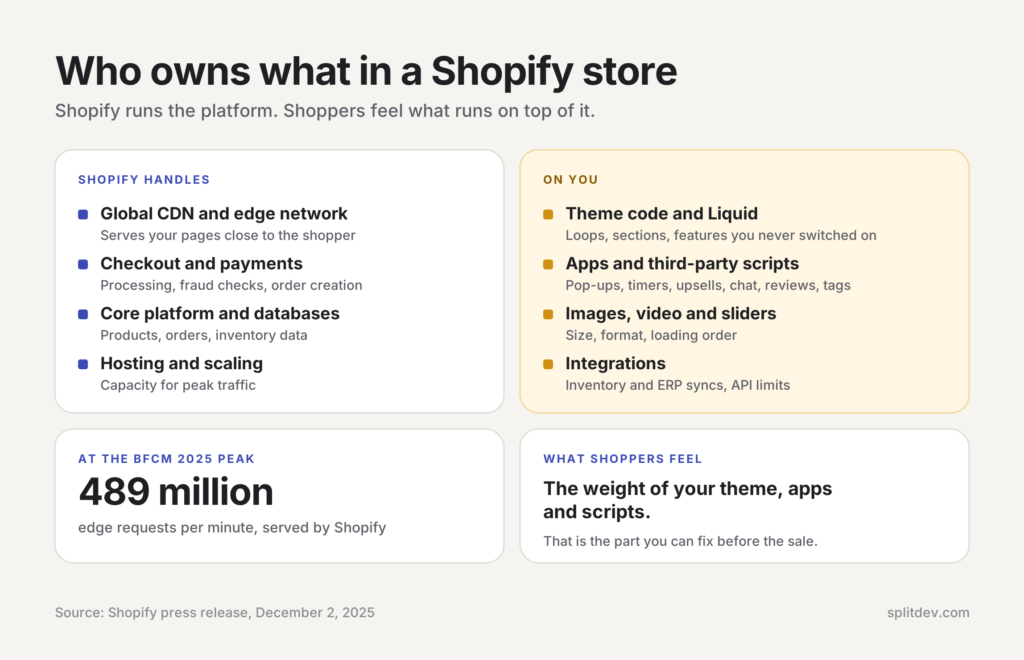
Shopify’s platform processed record volume over the 2025 Black Friday and Cyber Monday (BFCM) weekend. Shopify reported $14.6 billion in merchant sales, a peak of $5.1 million per minute, and up to 489 million edge requests per minute.
That capacity is Shopify’s side of the deal. Your theme, apps and third-party scripts are yours, and they decide whether shoppers ever feel that speed. If your store already feels slow on a quiet Tuesday, Black Friday traffic will turn that into abandoned carts.
This guide covers Shopify speed optimization before a sale: what to measure, which fixes pay off first, what breaks under peak load, and a 10-day plan.
What Shopify Handles and What Is on You
Shopify runs the infrastructure under your store: the global CDN and edge network, checkout and payment processing, and the core platform and databases.
You own everything that runs on top of it:
Theme code and Liquid logic
Apps and the JavaScript they inject
Images, video and other media
Third-party scripts for tracking, chat, reviews, upsells and pop-ups
Custom integrations, including inventory and ERP syncs
The edge network can serve hundreds of millions of requests per minute, but your store still has to send clean HTML, right-sized assets and scripts that do not block the page.
Measure First: The Numbers That Matter
Capture a baseline before you change anything, or you cannot tell whether a fix worked. Shopify store speed and page speed are measured two ways, and mixing them up is the most common mistake.
Core Web Vitals Thresholds (LCP, INP, CLS)
Shopify Core Web Vitals use Google’s three metrics and thresholds. Google defines them at the 75th percentile of real visits, so three out of four visits must meet the target.
Metric
Good
Needs improvement
Poor
LCP (Largest Contentful Paint)
2.5 s or less
2.5–4.0 s
Over 4.0 s
INP (Interaction to Next Paint)
200 ms or less
200–500 ms
Over 500 ms
CLS (Cumulative Layout Shift)
0.1 or less
0.1–0.25
Over 0.25
Thresholds from Google’s Web Vitals documentation, assessed at the 75th percentile of real visits.
LCP is how fast the main content appears, usually the hero image. INP is how quickly the page responds after a tap or click. CLS is how much the layout jumps while loading. INP replaced First Input Delay (FID) in March 2024, so a guide that still lists FID is out of date.
Field Data vs Lab Scores
Lab tools such as Lighthouse simulate one visit on a fixed device and network. They are the right tool for debugging, because they show the render-blocking script or the oversized image. They cannot tell you whether your store is fast for customers.
Field data comes from real visitors. PageSpeed Insights shows it from the Chrome User Experience Report (CrUX) over the previous 28 days, and only for public URLs with enough traffic. A store can score above 90 in a lab test and still fail in the field, because real shoppers use older phones and slower connections.
That is why chasing 100 points is a trap, and Shopify’s own help center says there is no such thing as a perfect speed score. Use field data to decide what to fix and lab data to confirm the fix, as Shopify’s developer documentation describes. A single Lighthouse run can swing by several points, so take the median of at least three. Lighthouse does not measure INP, so total blocking time (TBT) is the usual lab stand-in.
Shopify’s Web Performance Dashboard
Shopify shows real-user Core Web Vitals for your own store inside the admin:
Go to Online Store → Themes for a summary of LCP, INP and CLS over today, 7 days or 30 days.
For detail, go to Analytics → Reports and search for the LCP, INP or CLS report by name.
Open the over-time, page URL and page type reports to see when a score changed and which templates are responsible.
Each metric is rated Good, Moderate or Poor against the thresholds above. The over-time view marks app installs and theme updates on the chart, which makes it the fastest way to catch a sale app that slowed the store. On low-traffic stores, switch to weekly or monthly grouping. It collects data from Chromium-based browsers and Firefox only, so Safari visitors are missing.
The Usual Suspects Behind a Slow Shopify Store
When a Shopify site feels slow, the cause usually sits in apps and scripts, media, or theme code. Start with apps, the cheapest to fix.
Apps and Third-Party Scripts
Every app that adds a storefront script adds network requests and main-thread work. The usual offenders during BFCM season are pop-up and email capture tools, countdown timers, upsell widgets, review widgets, chat widgets and tag managers carrying many tags.
An app audit takes an afternoon:
List every installed app and note which ones load code on the storefront.
Open DevTools on the homepage, a collection page and a product page, and note which third-party domains respond.
Decide whether each app earns revenue during the sale. If it does not, disable it.
After removing an app, check the theme for leftover snippets, because uninstalling does not always clean up injected code.
Images, Video and Sliders
Oversized images are the classic cause of a poor LCP score. Full-width sliders that load several large images at once hurt most on mobile, and autoplay video above the fold often becomes the largest element.
Use Shopify’s image_url and image_tag filters with a few widths and a sizes attribute, so Shopify builds the srcset and the CDN serves the right size.
Add native lazy loading to images below the fold. Never lazy-load the hero image or the main product photo, because that delays LCP. Give the LCP image fetchpriority=”high” instead.
Set width and height, or an aspect ratio, so space is reserved before the image loads and the layout does not shift.
Replace autoplay video above the fold with a lightweight poster image.
Load only the first slide of a slider eagerly.
Theme Code and Liquid Loops
Heavy themes carry code for features you never switched on. Nested Liquid loops over large collections and too many sections slow server response and rendering. A lean Online Store 2.0 theme, such as Shopify’s reference theme Dawn, ships only the code it needs and uses JavaScript only where required.
A heavy theme often bundles sliders, mega menus, pop-ups and page-builder code that load on every page. To see which one you have, open DevTools on a product page, check how much JavaScript and CSS the theme loads, and look for features you never enabled.
A rich design does not automatically mean a slow theme. The Jack & Friends Jerky storefront is a heavily customized Dawn theme with floating botanical animations, flavor-based color theming and custom sliders, built with CSS, GSAP and custom JavaScript instead of heavy animation libraries.
Lab tests of its homepage on desktop show an LCP of 1.9 s, TBT of 60 ms and CLS of 0.002. Lab numbers for one page are not field data, but they show that a design this animated can stay light. A lighter custom Shopify theme carries only the features your catalog needs.
Shopify Speed Optimization Fixes in Order of Payoff
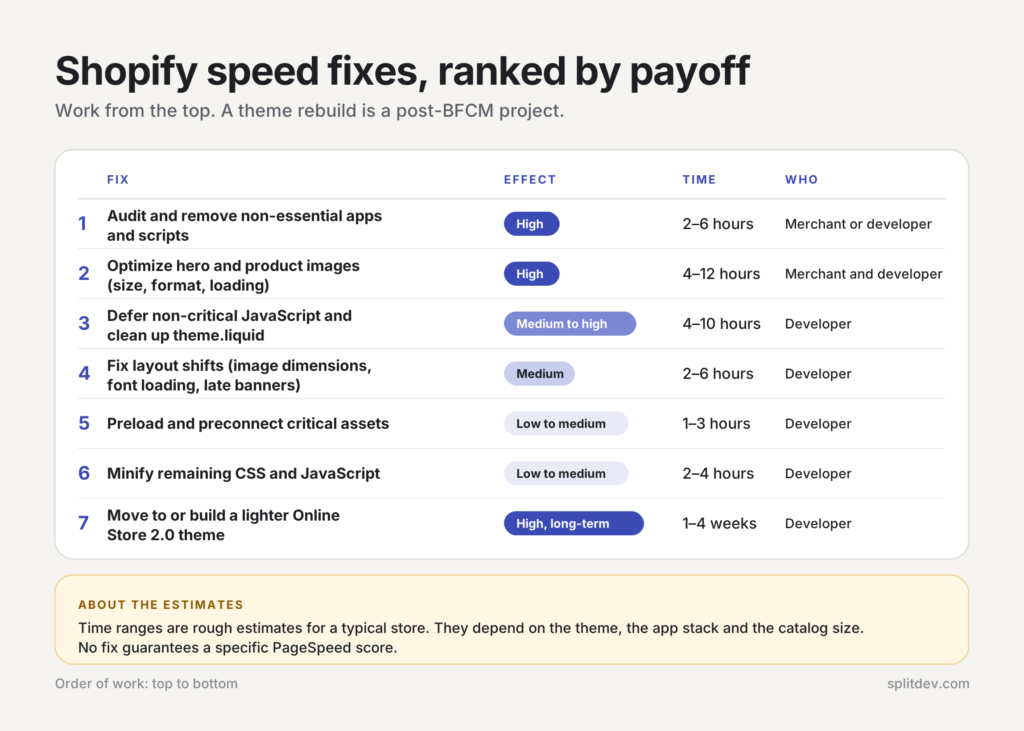
To speed up a Shopify store, work through the fixes in order of impact. The table below adds rough time estimates.
Fix
Effect
Time
Who
Audit and remove non-essential apps and scripts
High
2–6 hours
Merchant or developer
Optimize hero and product images (size, format, loading)
High
4–12 hours
Merchant and developer
Defer non-critical JavaScript and clean up theme.liquid
Medium to high
4–10 hours
Developer
Fix layout shifts (image dimensions, font loading, late banners)
Medium
2–6 hours
Developer
Preload and preconnect critical assets
Low to medium
1–3 hours
Developer
Minify remaining CSS and JavaScript
Low to medium
2–4 hours
Developer
Move to or build a lighter Online Store 2.0 theme
High, long-term
1–4 weeks
Developer
Time ranges are rough estimates for a typical store and depend on the theme, the app stack and the catalog size. No fix guarantees a specific PageSpeed score.
Start at the top: removing apps and fixing the largest images usually gives the quickest measurable gain. A theme rebuild does not fit inside a 10-day window, so treat it as a post-BFCM project.
Stability Check: What Breaks Under Peak Traffic
Speed and stability are related but separate. A store can load quickly on a normal day and still degrade at peak, because sale-only features, integrations and tracking behave differently when concurrency rises.
Sale-Only Apps (Pop-Ups, Timers, Upsells)
Many merchants switch on extra tools only for the sale: discount pop-ups, timers, upsell widgets, review carousels and chat. They are installed late and tested least. Under load they can block the main thread, fail when their own servers are busy, and push content around when a banner injects late.
Test each sale feature on a preview theme before it goes live. Our Shopify Black Friday checklist covers the full pre-sale list, including the code freeze date.
Inventory and ERP Syncs, API Limits
Real-time inventory syncs, order pushes to an ERP and heavy webhook traffic all call APIs. Shopify’s API rate limits apply to the Admin APIs, with figures that depend on the API and your plan, and your ERP may have its own limits. Shopper traffic does not count against that allowance, because Shopify does not rate-limit buyer traffic on the Storefront API. Your own syncs and apps do. At peak, a sync that works on a normal day can fall behind, which can lead to stale stock counts and overselling.
Review how often each sync runs and which can be batched or queued during the peak window. Make sure each integration stops after a throttle error, waits one second, which is the backoff Shopify recommends, and then retries.
Tracking Pixels and Tag Managers
Marketing pixels, analytics scripts and tag manager containers run on every page view, and together they weigh on INP when traffic peaks. Keep only the tags you need for measurement and attribution. Check that tags fire once, since duplicate events distort sale reporting and add load.
A Pre-Black Friday Load Test Plan for the Next 10 Days
Black Friday 2026 falls on November 27, and most Shopify stores freeze their theme around November 20, as our checklist explains. Start the plan below this week and you finish close to that freeze. Do not point artificial load-test traffic at a live store without clearing it with Shopify Support first, because Shopify’s bot protection can throttle it. This plan is a readiness test: measure, remove weight, test each sale feature, re-measure.
Days 1–2: baseline
Pull Core Web Vitals from the Shopify dashboard and Search Console.
Run PageSpeed Insights on the homepage, a collection page and a product page, on mobile.
List every app and script on the storefront.
Days 3–5: remove weight
Disable or remove non-essential apps.
Fix the 10–20 images that appear above the fold.
Defer or remove unnecessary third-party scripts.
Days 6–8: test sale features
Test pop-ups, timers, upsells, reviews and chat on a preview theme, on real phones.
Check inventory sync behavior and API usage.
Fix obvious layout shifts.
Days 9–10: re-measure and freeze
Re-run lab tests and compare against the baseline. Field data lags, so it will not move yet.
Test the full checkout path on several devices.
Freeze theme changes around November 20 and write a rollback plan for every new sale app.
What Rebuilt Stores Earned
Speed work rarely happens alone, and neither number below is a pure speed result.
Jack & Friends Jerky launched a new Shopify storefront, and mobile conversion rose 34% after launch, according to the brand. For Star Pro Combat, custom design and development with multilingual and multicurrency support came with a 48% rise in conversion and a 63% rise in revenue per visitor, according to the client.
For a speed-specific benchmark, see the Milliseconds Make Millions study, commissioned by Google and run by Fifty-five and Deloitte. Across 37 European and American brands, a 0.1-second improvement across four speed metrics on every page of the mobile journey was associated with 8.4% higher conversion on retail sites. The data comes from late 2019, before Core Web Vitals existed, so read it as direction, not as a forecast for your store.
When to Bring in a Developer
You can handle app audits, basic image fixes and sale-only tools yourself. Bring in a developer when:
Core Web Vitals stay poor after the easy fixes
The theme is heavy or outdated and needs structural cleanup
You need custom Liquid optimization or section refactoring
Integrations cause failures under load
You want a prioritized implementation list before BFCM
A speed and stability check before the peak covers the app and script inventory, a review of the theme and Core Web Vitals, and a report ranked by priority. To start, talk to SPLIT about a speed and stability check. SPLIT Development can also stay on your store through the sale with ongoing support during peak season.
FAQ
What is a good Shopify speed score?
A good Shopify speed score means passing Core Web Vitals at the 75th percentile of real visits: LCP of 2.5 seconds or less, INP of 200 milliseconds or less, and CLS of 0.1 or less. There is no single score to chase. Shopify’s Web Performance dashboard and Google Search Console show these field numbers. Lab scores from Lighthouse help with debugging, but they come second to real-user data.
Can Shopify handle Black Friday traffic?
Yes. Shopify reported a peak of 489 million edge requests per minute and $5.1 million in sales per minute during BFCM 2025. Individual stores can still slow down if their themes, apps and scripts are heavy. Storefront weight is the part you control, so that is where preparation pays off.
Do Shopify apps slow down my store?
Many do. Apps that inject JavaScript, CSS or extra network requests add weight and main-thread work on every page they load, and the effect compounds with each app. Audit the apps that load on your storefront, then remove or replace those that are not essential. Temporary sale tools deserve the closest look.
How long does Shopify speed optimization take?
Quick wins such as app cleanup and image fixes can show results within a few days. Theme-level and structural work usually takes 1–4 weeks, depending on the starting point and scope. Field data in the Web Performance dashboard also needs time to reflect changes, so start well before a major traffic event.
Why is my Shopify store loading slowly?
A Shopify store usually loads slowly because of what runs on top of the platform: apps and third-party scripts, oversized images and video, and heavy theme code. Start with an app audit, the quickest fix with the biggest effect. The Web Performance dashboard shows which page types are slow, and PageSpeed Insights shows which element drags down LCP.
Does Shopify speed affect SEO?
Yes, indirectly. Google recommends good Core Web Vitals and says they align with what its core ranking systems seek to reward, but they are one signal among many, so a fast store does not guarantee top rankings.