Shopify A/B Testing: Why It Pays and What to Test First
E-commerce, Guide, Shopify
Nov, 12 2026
Shopify A/B Testing: Why It Pays and What to Test First
Shopify A/B testing is the cleanest way to stop arguing about design opinions and start counting money. Instead of shipping a change because someone “feels” it will convert better, you show two versions to real traffic, measure the difference, and keep the winner.
Here is a quick illustration with example numbers: a store doing 50,000 sessions a month at 1.8% conversion and $85 AOV. A relative lift of 8% in conversion rate would add roughly $6,120 in monthly revenue if it holds. Whether a store can actually prove a lift like that depends on its traffic, which we cover below.
What A/B testing on Shopify actually means
An A/B test (also called a split test) shows version A (the control) to one group of visitors and version B (the variation) to another. You measure the same primary metric on both groups under the same conditions and decide which version produces more revenue. You will also see it called Shopify AB testing or Shopify split testing. The mechanics are the same: the store divides visitors at random and the data picks the winner.
On Shopify this can mean:
Changing the above-the-fold layout on a product page
Testing different shipping-threshold messaging
Trying a quantity-break or bundle offer
Comparing a cart drawer against a full cart page
The question to answer is which version makes more money per visitor.
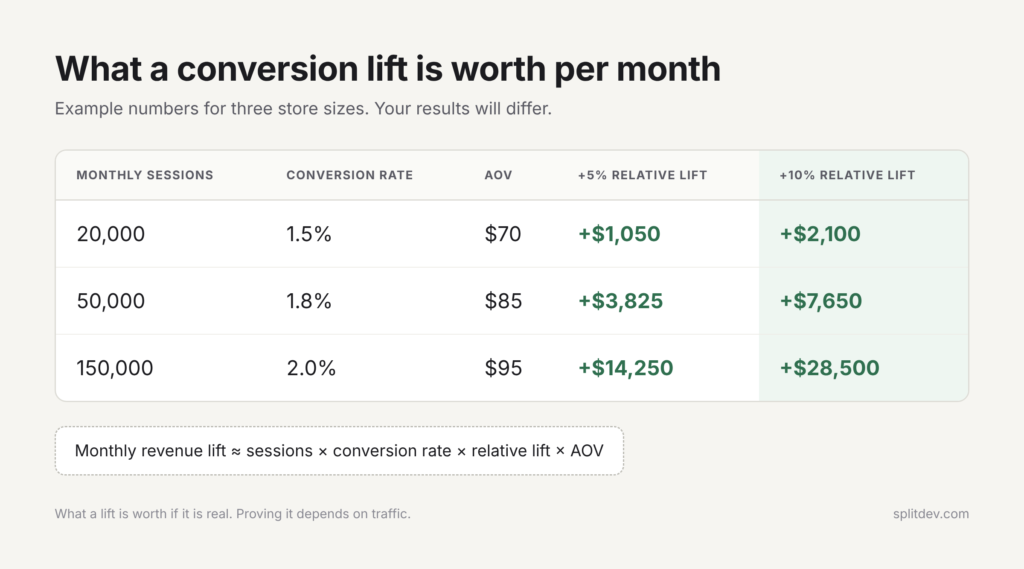
Here is an illustration for three common store sizes (illustrative numbers; your results will differ):
Monthly sessions
Current CR
AOV
+5% relative lift
+10% relative lift
20,000
1.5%
$70
+$1,050
+$2,100
50,000
1.8%
$85
+$3,825
+$7,650
150,000
2.0%
$95
+$14,250
+$28,500
The columns show what a lift is worth if it is real. Confirming it is a separate question: at these volumes, only the 10% lift for the 150,000-session store can be proven in about a month, as the next section shows.
When testing does not make sense yet (low traffic)
Traffic decides what you can prove. A rough guide: a test needs about 16 × p × (1 − p) ÷ d² visitors per variant, where p is your conversion rate and d is the absolute lift you want to detect (80% power, 95% confidence). At a 2% conversion rate, confirming a 20% relative lift takes about 19,600 visitors per variant, roughly 39,000 in total. A 10% lift takes four times that, around 157,000.
So if the page you want to test gets fewer than roughly 40,000 sessions a month, only big changes can be confirmed within a month, and small ones may never reach a clear answer. In that case, testing is the wrong tool for now.
What to do instead:
Fix obvious UX and technical issues first (speed, mobile layout, clear CTAs)
Run qualitative research (session recordings, heatmaps, short surveys)
Implement high-confidence, low-risk changes and measure overall revenue trends
Grow traffic until the math supports proper experiments
Shopify Rollouts vs testing apps
What Rollouts can do
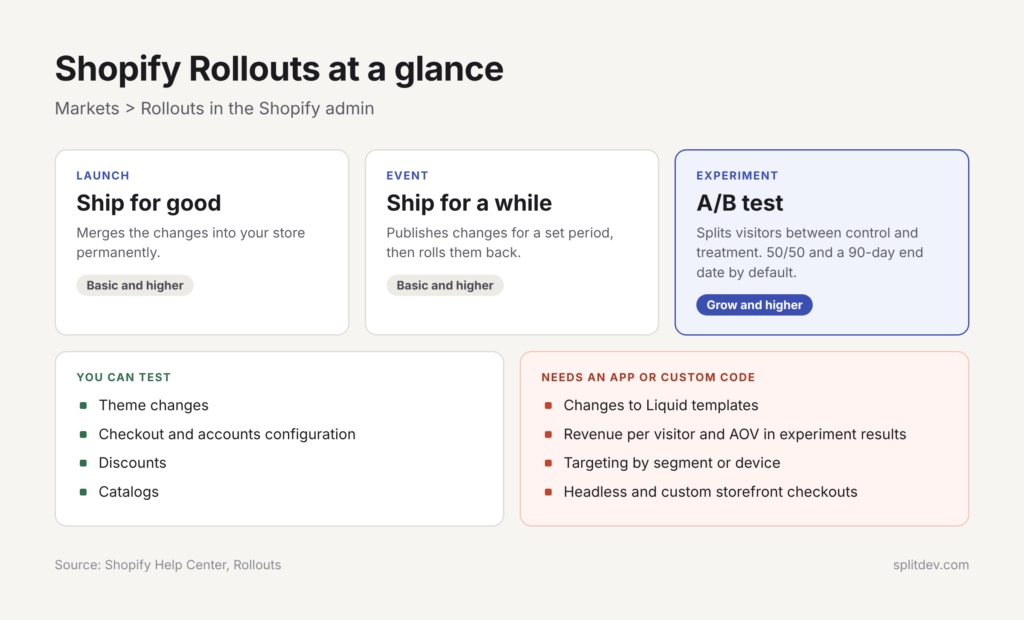
Shopify Rollouts (introduced with the Winter ’26 Edition) is the native way to run experiments. You find it under Markets > Rollouts in your Shopify admin, and Shopify’s Rollouts documentation covers the details. A rollout comes in three types: a Launch merges changes into your store permanently, an Event publishes them for a set period and then rolls them back, and an Experiment compares a treatment against a control. A Shopify Rollouts A/B test is the Experiment type.
Key capabilities:
Experiments split eligible visitors between control and treatment, 50/50 by default, with an end date 90 days after the start. You can change both before saving
You can test theme changes (editing or replacing the main theme), a replacement checkout and accounts configuration, discounts, and catalogs
Launches and time-limited Events cover scheduled changes such as seasonal sales
Each visitor is assigned to a group before the page loads and stays in it through a cookie, so the page doesn’t flicker between versions
Rollouts are available on the Basic plan or higher. Experiments need the Grow plan or higher.
Where you still need an app or custom code
Rollouts covers many storefront and checkout-configuration tests, but it has limits that matter for a testing program:
Liquid templates can’t be changed as part of a rollout, so layout changes that need new Liquid or conditional logic need custom development
Experiments report a short fixed list of metrics: conversion rate, bounce rate, reached-checkout rate and add-to-cart rate for theme tests, and checkout conversion rate for checkout tests. Gross sales and average order value appear only for Launch rollouts, so revenue per visitor needs a testing app or custom tracking
Visitors are split at random. You can’t target a segment, a customer tag or a device, and you can’t filter results by device or country
Third-party testing apps fill many of these gaps. Depending on the tool, they add revenue and RPV reporting, device and segment targeting, element-level tests and price tests.
When the change lives in theme code or needs more control than Rollouts offers, we build custom test variants in your theme code or use a lightweight testing layer.
The first 4 tests we’d run on most Shopify stores
If you are looking for A/B test ideas for Shopify, start with these four. They cover common friction points: the product page, the delivery promise, the offer and the cart.
1. Product page: above-the-fold layout on mobile
Mobile often makes up most of a store’s traffic, so check your own analytics first. Test a tighter above-the-fold experience: primary image, clear title and price, prominent Add to Cart, and minimal competing elements. This layout change fits a Rollouts Experiment when you make it in the theme editor, but results can’t be filtered by device, so judging the mobile effect takes a testing tool or custom tracking. Our guide to UX fixes worth testing has more ideas for this page.
2. Shipping threshold and delivery messaging
Free shipping thresholds and estimated delivery dates can affect trust and AOV. Test different threshold amounts, the wording of the progress bar, and whether the messaging appears in the cart drawer, on the product page, or both.
3. Bundles or quantity breaks
Offer a simple “Buy 2, save 10%” or a product + complementary item bundle and measure both conversion rate and revenue per visitor. Odyssey, a functional energy drink brand, saw subscription conversion grow 41% and average order value 18% after we built its Shopify store with subscriptions and bundles. That result came from a store build without an A/B test, so the same ideas are good candidates for a formal test on your store.
One Rollouts caveat applies here. If an Experiment changes prices, discounts or catalogs, the change shows only in your online store, while ads, listings and product feeds keep the old details. Google and Meta can flag or delist offers that don’t match, so pause ads for the affected products during the test.
4. Cart drawer vs cart page
Some stores convert better with a full cart page; others prefer the speed of a drawer. Test both experiences with the same upsells and shipping messaging to see which path produces higher revenue per visitor.
How to run a test that gives a real answer
Write a hypothesis you can lose
Good hypothesis format:
“If we [change], then [metric] will improve because [reason]. We will know this is true if [success criterion].”
Example:
“If we move the Add to Cart button higher and reduce above-the-fold elements on mobile product pages, then add-to-cart rate and revenue per visitor will increase because fewer shoppers bounce before seeing the primary CTA. Success = statistically significant lift in RPV with no drop in average order value.”
A hypothesis you are willing to lose forces clearer thinking and cleaner test design. A backlog from a conversion audit gives you hypotheses grounded in your own data.
Sample size, duration and stopping rules
How long should an A/B test run? Long enough to reach the sample size you calculated before launch, and never less than one full week, so weekday and weekend shoppers are both in the data. Most tests take 1–3 weeks on a busy page and longer on a quiet one.
Calculate the required sample size before you start, using the formula above or any free A/B sample-size calculator
A new Rollouts Experiment defaults to a 50/50 split and an end date 90 days out, so adjust both to fit your plan
Do not stop early just because one version is ahead
Pre-define the primary metric and the decision rule
Track revenue per visitor, not only conversion rate
Conversion rate alone can mislead. A variation that converts more people at a lower average order value can lose money. Always look at revenue per visitor (RPV) or revenue per session. A Rollouts Experiment doesn’t report revenue or AOV, so RPV needs a testing app or custom tracking alongside it.
KXKS, a sports and travel bags brand, saw revenue per visitor grow 27% after we built custom product logic into its Shopify store. That result also came without a test, which is why a change like this is worth testing before you rely on it.
Mistakes that waste a month of traffic
Stopping the test as soon as one version looks better
Changing more than one major element at a time (you no longer know what caused the result)
Ignoring mobile or running the test only on desktop traffic
Looking only at conversion rate and ignoring RPV and AOV
Running tests on pages with almost no traffic
Letting the test drag on for months without a decision
Changing the traffic split mid-test, which affects only new visitors and makes the groups hard to compare
Introducing heavy client-side scripts that slow the page and bias results
Speed and SEO. Rollouts assign each visitor to a group before the page loads, so there is no flicker. For organic traffic, Shopify’s guidance is to keep product URLs stable, avoid temporary page errors on indexed products, and use a rollout that reaches all visitors for important availability changes. Browser-based scripts from third-party tools can add weight, so check Core Web Vitals before and after.
What a monthly testing program looks like
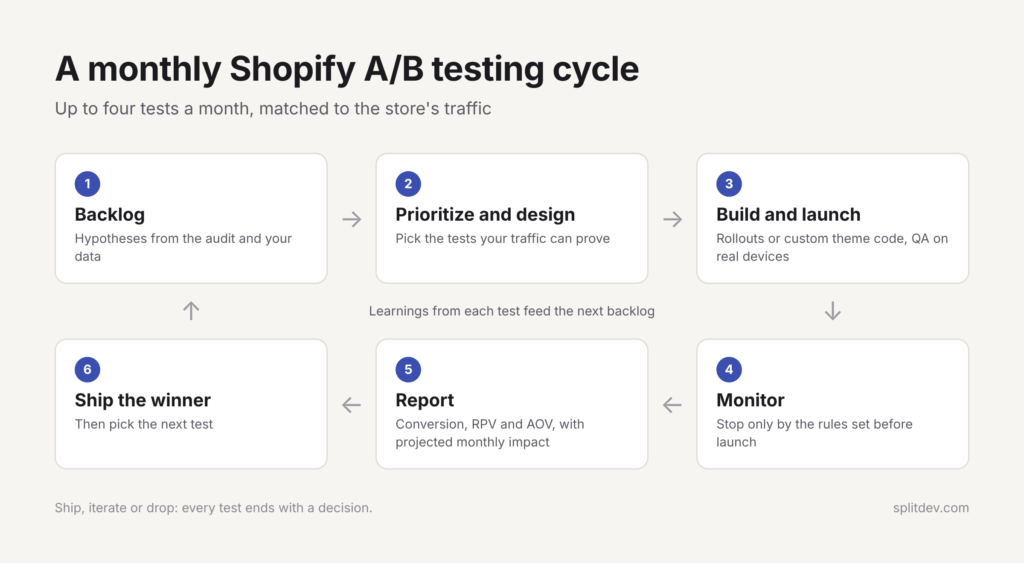
A practical ongoing program looks like this, and our Growth package follows the same steps:
Hypothesis backlog from audit and data
Prioritize and design up to 4 tests per month, matched to your traffic
Build and launch the variants (Rollouts or custom theme code)
Monitor and stop according to pre-set rules
Analyze results with a short business report (what won, why, revenue impact, next recommendations)
Ship the winner and feed learnings into the next cycle
The report is the piece teams often skip. Owners need a clear answer: “This change is projected to add $X per month. Here is what we recommend testing next.”
A useful business report for each test includes:
The hypothesis and exactly what changed
Results for conversion rate, RPV and AOV, and the sample size reached
Whether the result is statistically reliable
The projected monthly revenue impact, labeled as an estimate
The decision: ship, iterate or drop
The next test we recommend
The first 30 days can look like this. In week one we confirm baselines for conversion rate, AOV and RPV by device and do the sample-size math. Then we build and QA the variants, launching the product page and shipping tests first, with bundles and the cart after. Tests on different parts of the funnel can run side by side, and Rollouts flags conflicts between overlapping rollouts before you save.
Start with a clear backlog
If you do not yet have a prioritized list of hypotheses, begin with a CRO audit. The audit produces the first set of high-confidence test ideas. From there the monthly Growth package turns those ideas into a steady stream of measured experiments (up to 4 tests a month, each with a business report).
FAQ
Does Shopify have built-in A/B testing?
Yes. Shopify Rollouts, found under Markets > Rollouts in your admin, includes an Experiment type that compares a treatment against a control. Experiments require the Grow plan or higher, while launches and scheduled events are available from Basic.
How much traffic do I need to A/B test my Shopify store?
About 40,000 sessions a month on the page you are testing lets you confirm a large change, around a 20% relative lift, in roughly a month at a 2% conversion rate. Smaller lifts need far more traffic: a 10% lift takes about four times as many visitors. Lower-traffic stores should focus on qualitative research and high-confidence fixes first.
How long should a Shopify A/B test run?
Until it reaches the sample size you calculated before launch, and for at least one full week so weekday and weekend behavior are both covered. A common range is 1–3 weeks on a busy page, and quieter pages take longer. Do not stop early because one version looks ahead.
Does A/B testing slow down my Shopify store or hurt SEO?
Not by itself. Rollouts assign each visitor to a group before the page loads, so visitors don’t see a flicker between versions. Shopify also advises keeping product URLs stable and avoiding temporary page errors to protect indexed pages. Third-party scripts that run in the browser can add weight, so measure Core Web Vitals before and after any test.
What can you A/B test on Shopify?
With native Shopify Rollouts you can test theme changes, a replacement checkout and accounts configuration, discounts, and catalogs. Common starting points are the mobile product page layout, shipping threshold messaging, bundles or quantity breaks, and the cart drawer versus a cart page.
Can I split test Shopify checkout without Shopify Plus?
Yes, based on Shopify’s rollout documentation: Experiments require the Grow plan or higher, and Shopify Plus is not listed as a requirement. A checkout test replaces your checkout and accounts configuration for part of your visitors and reports checkout conversion rate. Checkouts on headless and custom storefronts can’t be tested with rollouts.