PWA vs Native App: What Makes Sense for a Shopify Store
E-commerce, Shopify, Web app
Nov, 17 2026
PWA vs Native App: What Makes Sense for a Shopify Store
The idea of a store app often comes up before there is data behind it. The PWA vs native app question then turns into a budget discussion, and a native iOS and Android build is a big project to commit to if shoppers never asked for it.
There is a cheaper way to find out. Launch a progressive web app (PWA) first, track real behavior for 90 days, and decide on a native app only if the numbers support it. The PWA works as a minimum viable version of the app, so usage answers the question instead of opinions.
This guide is written for Shopify store owners, not for startups where the app is the product. It compares four routes, explains the iOS push rules, and shows when a native app pays back.
Four ways to put your Shopify store on a phone
If you want to convert a Shopify store to an app, four routes cover almost every case: a PWA, a native app, a cross-platform app, and a no-code app builder. They differ in cost, store distribution, and how much control you keep.
Progressive web app (PWA)
A progressive web app is a website that can be installed on a phone’s home screen, open full screen, and keep key pages available offline. With conditions, it can also send push notifications. It runs on standard web technology: HTML, CSS, JavaScript, a web app manifest, and a service worker.
For a Shopify PWA, the usual path is a custom or headless storefront with the manifest and service worker added. Hydrogen, Shopify’s React-based framework for custom storefronts, is one option. Catalog, inventory, and checkout stay in Shopify, and shoppers can still pay with Shop Pay. A PWA is installed from the browser, so it does not get an App Store listing the way a native app does.
Native app (Swift / Kotlin)
A native app is built separately for iOS (Swift) and Android (Kotlin). It has full access to device hardware, the smoothest animations, and a listing in the App Store and Google Play. It also needs Apple and Google developer accounts, store review for each release, and two codebases to maintain.
Cross-platform app (React Native)
React Native and Flutter let one team write most of the code once and ship to both iOS and Android. Development costs less than two native builds, and you keep App Store distribution and full push support. For typical catalog, cart, and account screens, performance is usually close to native.
No-code Shopify app builders
A Shopify app builder such as Tapcart or SimiCart turns an existing store into a branded mobile app with templates, push notifications, and basic customization. Plans run from free to several hundred dollars a month. You launch in days or weeks and accept the platform’s limits on design and features. It is the fastest route into the App Store and the least custom one, so you also depend on the vendor’s roadmap and pricing. Our Shopify app development guide covers the signs that off-the-shelf tools stop being enough.
PWA vs native app: side-by-side for ecommerce
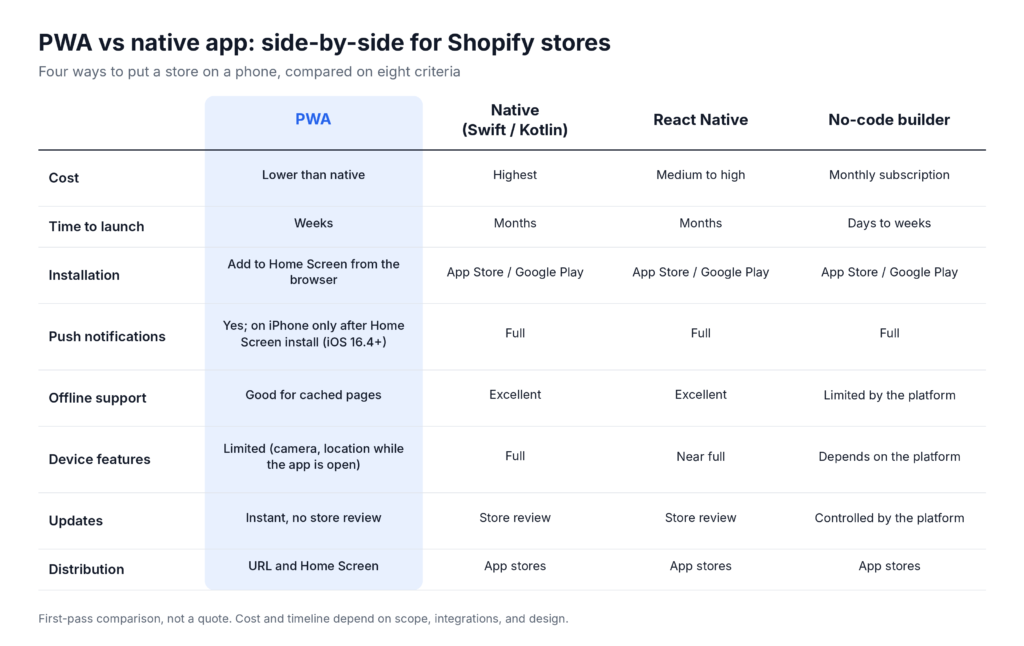
A PWA wins on cost and launch speed, and it updates without store review. Native and React Native win on device access and offline depth, and they come with an App Store listing. A no-code builder sits in between on speed and below both on customization.
Criterion
PWA
Native (Swift / Kotlin)
React Native
No-code builder
Cost
Lower than native (custom storefront work)
Highest
Medium to high
Monthly subscription
Time to launch
Weeks
Months
Months
Days to weeks
Installation
Add to Home Screen from the browser
App Store / Google Play
App Store / Google Play
App Store / Google Play
Push notifications
Yes; on iPhone only after Home Screen install (iOS 16.4+)
Full
Full
Full
Offline support
Good for cached pages
Excellent
Excellent
Limited by the platform
Device features
Limited (camera, location while the app is open)
Full
Near full
Depends on the platform
Updates
Instant, no store review
Store review
Store review
Controlled by the platform
Distribution
URL and Home Screen
App stores
App stores
App stores
The cost table below compares the routes in rough order. Actual budgets depend on scope, so compare real quotes before you commit.
Push notifications, iOS and other fine print
Push works on both platforms, but not the same way. On Android, a PWA can ask for notification permission from a regular browser tab. On iPhone, the rules are stricter.
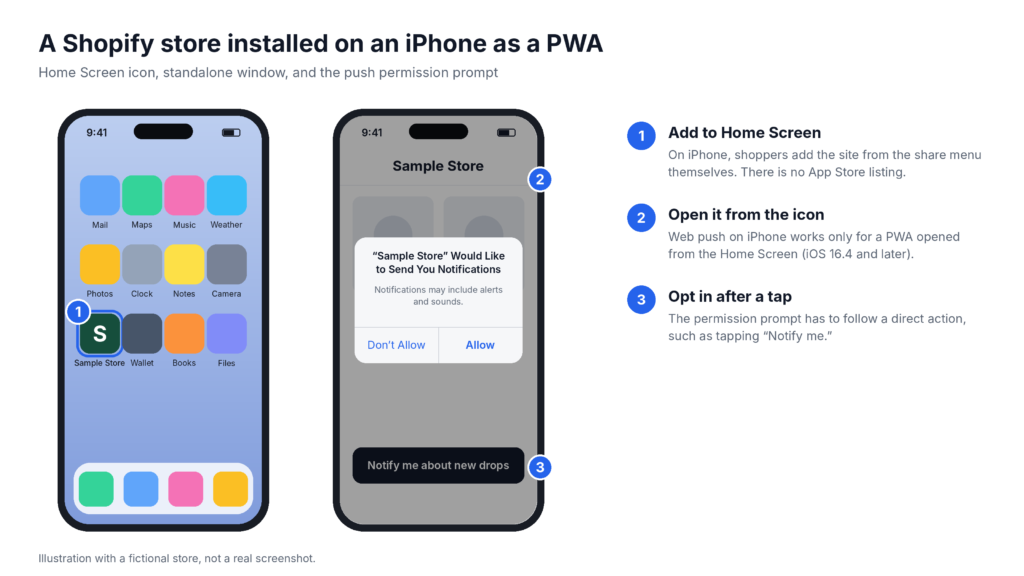
Since iOS and iPadOS 16.4, Web Push works for web apps added to the Home Screen. A visitor who only browses in Safari never sees the permission prompt. The site has to be added to the Home Screen first, and the permission request has to follow a direct user action, such as tapping a “Notify me” button.
iPhone shoppers therefore need two steps before the first push: install, then opt in. Installation is also less obvious than on Android, where the browser can prompt shoppers to install. On iPhone, shoppers have to find “Add to Home Screen” in the share menu themselves. iOS behavior changes between versions, so test the install steps on a current iPhone before you design the prompt.
The EU adds a footnote. In the iOS 17.4 beta in early 2024, Apple removed Home Screen web apps for EU users, then reversed the decision before the final release. Apple’s developer FAQ now says the existing capability continues in the EU.
Two Shopify details matter as well. Shoppers can already use Shopify’s Shop app to track orders and discover brands, so a branded PWA or app should offer something Shop does not. And checkout stays on Shopify’s side in PWAs, headless storefronts, and most apps: the customer still pays through Shopify checkout or Shop Pay.
Test app demand with a PWA before you go to the App Store
A PWA has no App Store review, so it launches and updates the same day, and the 90-day test gives you your own numbers.
What to measure in the first 90 days
Tag sessions that run in standalone mode (launched from the Home Screen icon) so your analytics can separate them from regular mobile browser sessions. Then track:
Home Screen install rate: the share of mobile visitors who add the icon.
Return-visit frequency from the icon compared with the mobile browser.
Push opt-in rate among installed users.
Share of mobile revenue that comes from installed PWA users.
Push campaign results: open rate, click-through rate, and attributed orders.
Friction in the install flow, especially on iOS.
The numbers that justify a native app
No benchmark fits every store, so set your threshold before the test starts. Write it as a payback rule:
Payback (months) = (build cost + 12 months of maintenance) / (monthly incremental gross profit from app users)
“Incremental” means profit the same shoppers would not have generated on the mobile site. Choose a payback window your team accepts, for example 12 to 18 months, and read the PWA data against it. A native app starts to look justified when:
Mobile is already the majority of your sessions and revenue.
The share of mobile visitors who install the PWA and come back repeatedly clears the threshold you set before the test.
Push opt-in among installed users and the incremental revenue from campaigns clear the thresholds you set.
You need something a PWA does poorly: AR try-on, background location, complex offline catalog sync, App Store discoverability, or the widest push reach on iOS.
The projected gain in retention or average order value pays back the build and maintenance cost inside your window.
If install and return rates stay weak, the cause is often the offer, the mobile experience of the current store, or low demand for a dedicated app, not the technology. Start with mobile UX on your current store.
Jack & Friends Jerky is one example. We designed and built the brand’s mobile-first Shopify store in seven weeks, and mobile conversion rose 34% after launch. The project was a store build, and it shows that for some brands a fast, clear phone experience does the job an app was supposed to do.
When a native app is the right call from day one
Skip the PWA test only when the business case is already clear:
You sell high-frequency purchases such as coffee, meal kits, beauty replenishment, or supplements.
Brand loyalty and repeat-purchase rates are already strong.
You need hardware features that web APIs still handle poorly.
You want an App Store listing as a marketing and trust channel.
You can fund ongoing native maintenance and the marketing of the app itself.
In those cases React Native is often the practical middle path: one codebase, native distribution, and a lower cost than separate Swift and Kotlin builds.
Use this table to match your situation to a starting point:
If your store…
Then start with…
Has no data on app demand yet
A PWA and the 90-day test
Gets most orders on mobile but converts poorly there
Mobile UX fixes, then revisit the app question
Needs a branded App Store app soon, with standard features
A no-code builder or React Native
Needs AR try-on, background location, or deep device access
React Native or a fully native app
Sells replenishment products to a loyal customer base
React Native, scoped from day one
Wants a Home Screen icon and push without an App Store listing
A PWA, with a guided iOS install step
What each option costs and how long it takes
Shopify mobile app cost depends mostly on the route you pick, so treat this table as a rough comparison, not a budget.
Option
Approximate cost
Typical timeline
Notes
No-code builder
Free to several hundred dollars per month
Days to 3 weeks
Fastest route, limited customization; Apple Developer account $99 per year on top
Custom PWA / headless storefront
Project-based, below native
Weeks
Depends on storefront complexity
React Native
Medium to high, quoted per project
Months
iOS and Android from one codebase
Fully native
Higher than React Native
Several months
Two codebases plus store review
A rough comparison, not a quote. Your budget depends on scope, integrations, and design.
How we’d approach it for your store
At SPLIT, we start with the data you already have: mobile traffic share, conversion rate by device, repeat-purchase rate, and the mobile UX problems on your current store. From there we recommend the lowest-risk path that answers one question: do your customers want an app experience?
If a PWA or a mobile-first storefront improvement is the right first step, we scope that. If the numbers already support a native or React Native app, we scope that instead. You can see how we work on Shopify app development projects before you book.
Can I turn my Shopify store into a mobile app without the App Store?
Yes, as a progressive web app. A PWA installs on the Home Screen of Android phones and iPhones without any App Store submission, and it keeps using your Shopify catalog and Shopify checkout. It is not an App Store app, so it has no store listing. On iPhone, installation is a manual “Add to Home Screen” step, and push notifications only work after that step.
Do PWA push notifications work on iPhone?
Yes, since iOS 16.4, but only for a PWA that the user added to the Home Screen and opened from its icon. A regular Safari tab cannot receive web push. The permission request must also follow a direct user action, such as tapping a “Notify me” button. On Android, a PWA can ask for permission from a normal browser tab.
Is a PWA cheaper than a native app for a Shopify store?
Usually, yes. A PWA is one web codebase with no store review, while a native app means two codebases (or one with React Native), store review, and ongoing maintenance. The size of the gap depends on scope, so get quotes for both. A PWA also produces the usage data that tells you whether a larger native budget is justified.
Will a PWA hurt my Shopify SEO?
Not by itself. A PWA is still a website, and search engines crawl and index its URLs like any other site. The risk sits in the build: a headless storefront that renders content only in the browser, or one that changes your URLs, can hurt indexing. Keep server-rendered pages and stable URLs, and the installable layer adds to your site without replacing the crawlable version.
Can a PWA replace a native app?
For the core shopping job, often yes: browsing, cart, handoff to Shopify checkout, and push notifications. A PWA cannot replace a native app where you need deep device access such as AR try-on or background location, a full offline catalog, or an App Store listing.
Should a store build a PWA or a native app first?
Build the PWA first unless the case for native is already clear, for example a high-frequency replenishment product with loyal customers. A PWA ships in weeks, updates without store review, and shows install, return-visit, and push opt-in data within 90 days. Those numbers tell you whether a native or React Native budget is justified.