Vibe coding for Shopify: where AI-assisted development saves budget and where it backfires
Development, Shopify
Nov, 24 2026
Vibe coding for Shopify: where AI-assisted development saves budget and where it backfires
Clients ask the same question more often now: “Can we do this cheaper with AI?”
Sometimes yes. On the right tasks, AI Shopify development (what the industry now calls vibe coding) cuts real hours and budget. On the wrong ones it creates technical debt that costs more to clean up later than building it properly the first time.
This guide is a developer’s view of Shopify vibe coding: where it helps, where it does not, and how to review what an AI agent produced before it goes live.
What vibe coding means on a Shopify project
Andrej Karpathy coined the term in a February 2025 post. He described a workflow where you “fully give in to the vibes, embrace exponentials, and forget that the code even exists.” He also called it fine for throwaway weekend projects, which matters before anyone applies it to a live store. You talk to the model, accept suggestions, paste errors back in, and keep moving. Collins Dictionary later named “vibe coding” its Word of the Year for 2025.
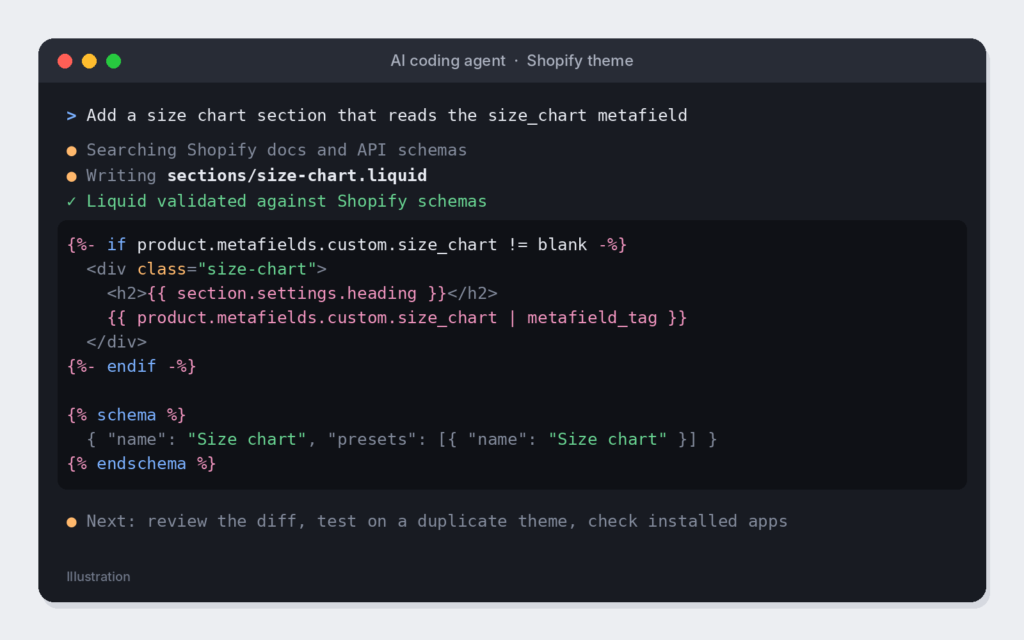
On a Shopify store that workflow usually looks like this. A developer (or a non-developer) opens Cursor, Claude Code, or a similar agent and describes a section or feature in natural language. Then they iterate until the Liquid, JavaScript, or script roughly works. With the Shopify AI Toolkit (released April 9, 2026) the agent also gets current documentation, API schemas, and validation for Liquid and UI extension code.
The result can be fast. It is not automatically production-ready.
Where AI-assisted development saves real budget
AI shines on work that is repetitive, well-scoped, or low-risk if it needs rewriting later.
Prototypes and landing pages
Need a campaign landing page or a concept for a new product template? An agent can generate a solid first draft of sections, layout, and basic interactivity in a fraction of the time a developer would spend. We treat these as disposable or as a starting point for refinement. The savings come from skipping the blank-page stage.
Repetitive theme sections and metafield wiring
Vibe coding a Shopify theme works best on repeated patterns: a product grid with custom badges, a FAQ accordion that pulls from metafields, a size chart block, or a set of collection filters. Once you have a clear pattern and good examples in the prompt, an agent produces usable Liquid and schema faster than a developer writing it from scratch. The developer still reviews and hardens it, but the bulk of the typing disappears.
Data cleanup, imports and migration scripts
CSV cleaning, metafield mapping, bulk product updates, or one-off migration scripts are excellent AI work. The logic is usually simple, the stakes of a bad first version are low if you run it on a staging store or a copy of the data, and the time savings are obvious. Drafting test cases and checks for the same scripts and sections is another place AI saves hours, as long as a developer decides what they must cover.
Internal tools and reports
Admin scripts, custom reports, inventory helpers, or simple internal dashboards rarely need the same level of polish as customer-facing code. AI is good enough for most of these, and the cost of fixing them later is low. If an internal tool grows into a full app, see building a Shopify app the long way.
In all of these cases the budget saving is real because the alternative is billable developer hours on work that does not require deep Shopify architecture knowledge.
Where it backfires
The problems appear when the generated code becomes part of the long-lived storefront or touches money, data, or core platform behavior.
Code quality and maintainability
Vibe-coded sections often work on the first look and fail six months later. Common patterns include duplicated logic, unclear variable names, missing error handling, and Liquid that is hard for the next developer (or the same developer) to modify. When the brand needs a change, the “cheap” section becomes the expensive one. The same applies to scripts: an import that writes to the wrong metafield namespace leaves a data cleanup job behind.
Theme updates and app conflicts
Shopify themes receive updates. Apps inject their own scripts and Liquid. Code that was generated without understanding the existing theme architecture or app ecosystem frequently breaks on the next update or conflicts with a new app. A section that hard-codes the theme’s class names, for example, can stop rendering correctly after an update and have to be rebuilt. Good Shopify theme development starts from the existing theme and the apps already installed.
Performance: heavy JS and duplicate libraries
Agents love adding JavaScript. They also love pulling in libraries. The result can be extra network requests, larger bundles, and slower Core Web Vitals. On a high-traffic store that cost shows up in conversion rate and ad efficiency. A section that loads its own copy of a slider library the theme already includes, for example, ships the same code twice.
Security and customer data
Any code that handles personal data, payment flows, discount logic, or customer accounts needs human scrutiny. A Forrester analyst wrote in March 2026 that AI-generated code often carries critical flaws such as exposed credentials, insecure dependencies, and insufficient validation, and that it can work while still falling far short of production-ready. Shopify’s own AI Toolkit announcement is explicit: the toolkit does not remove the need to test, review the diff, or validate behavior.
Some work should not be vibe coded at all: payment flows, subscription logic, anything that stores or transmits personal data, and deep ERP or inventory integrations. Checkout customizations need a developer in charge, even when an agent helps with repetitive parts such as extension upgrades. These are the places where a mistake is expensive or dangerous.
Task-by-task: AI, AI plus developer, or developer only
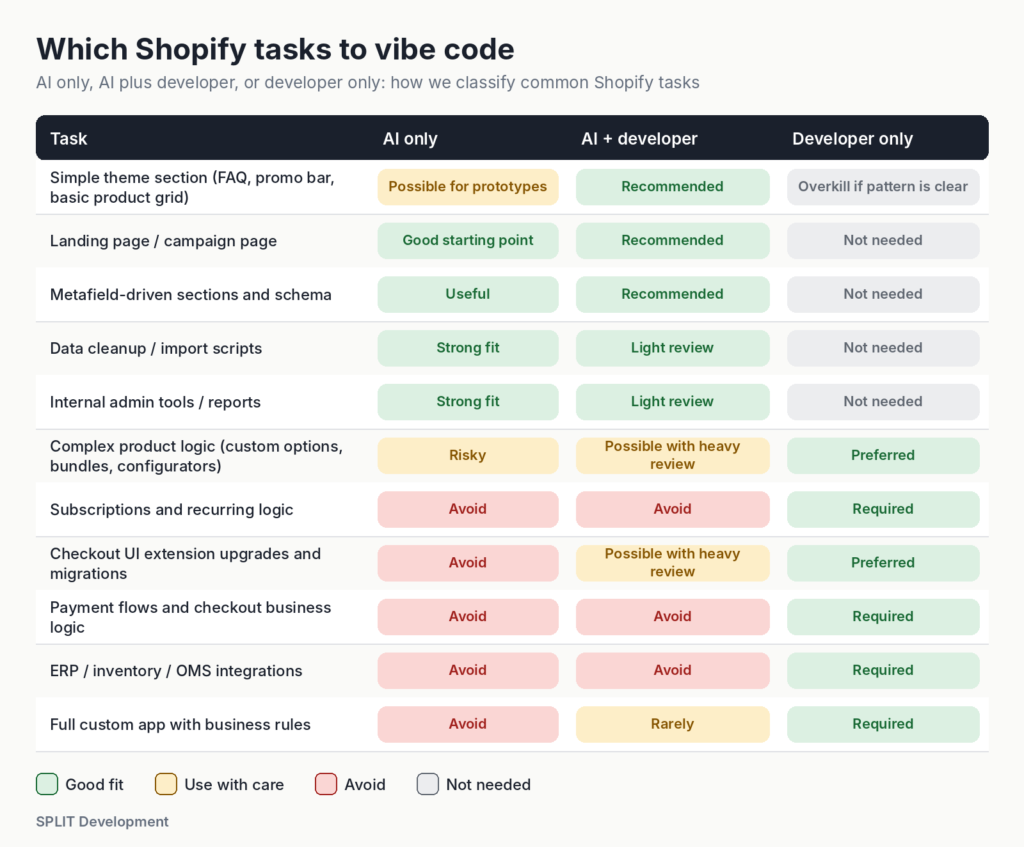
The table below shows how we typically classify common Shopify tasks.
Task
AI only
AI + developer
Developer only
Simple theme section (FAQ, promo bar, basic product grid)
On April 9, 2026, Shopify released the Shopify AI Toolkit. It connects supported agents (Claude Code, Cursor, Codex, VS Code and others) to current Shopify documentation, API schemas, validation for Liquid and UI extension code, and Shopify CLI workflows. If you use Claude Code on a Shopify project, the toolkit installs as a plugin.
This is a meaningful improvement. Agents no longer have to guess at the current shape of the Admin API or reinvent Liquid patterns. The official changelog is clear, however: the toolkit does not replace testing, reviewing the diff, or validating behavior in the actual store. It reduces the amount of context the human has to supply and catches some classes of error earlier. It does not turn an unreviewed agent into a senior Shopify developer.
Shopify also documents a dev MCP server, for example for working with Polaris. The signal is the same: better context for the agent, with the human still accountable for the result.
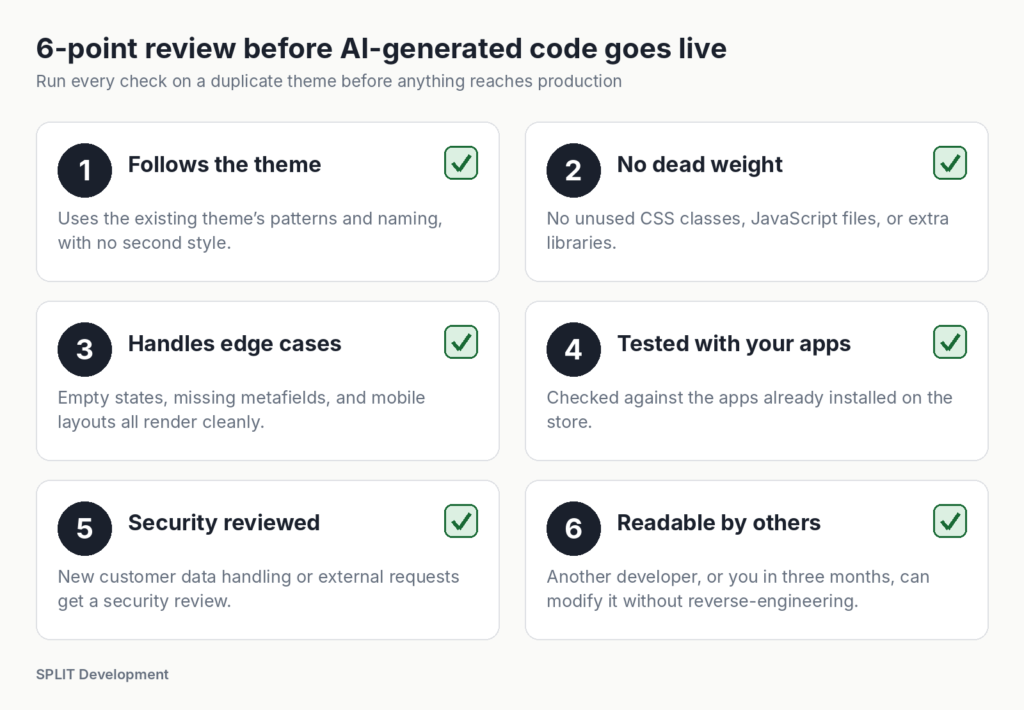
Already vibe coded a section? A 6-point review before it goes live
If AI-generated Shopify code already exists on your store, run this checklist before it reaches production:
Does the code follow the existing theme’s patterns and naming conventions, or does it introduce a second style?
Are there unused CSS classes, JavaScript files, or third-party libraries that can be removed?
Does it handle empty states, missing metafields, and mobile layouts cleanly?
Has it been tested against the apps already installed on the store?
Does it introduce any new customer data handling or external requests that need security review?
Can another developer (or you in three months) understand and modify it without reverse-engineering?
How to ship AI-generated code safely
Duplicate the live theme first and make every AI-assisted change in the copy. Preview it on a staging store or an unpublished theme, with the same apps your store runs today. Keep the code in Git and commit each generated change separately, so a bad one can be reverted without losing the rest.
Read the diff before merging. Agents often touch more files than you asked for, and a clean-looking section can hide a changed global script. Publish only when the six checks above pass, and keep the previous theme version available so you can roll back quickly. Never push vibe-coded changes straight to the live theme.
How we use AI on client projects at SPLIT Development
Our approach to AI on client projects comes down to one rule: a developer defines the requirements and owns the final code, and AI drafts the parts where the risk is low.
In practice the pattern is: the developer sets the requirement and constraints; the agent drafts a first version of a section, script, or prototype; the developer reviews it, rewrites the parts that matter, and owns the result. AI use is not free: review time is real time, and it belongs in the estimate.
Heavy custom product logic, like the work we did for KXKS, and subscription and checkout flows, like the scope we handled for Odyssey, are the kind of tasks that belong in the developer-only column. Those are exactly the areas of custom Shopify development where a clean architecture and clear ownership pay for themselves.
When a client already has vibe-coded sections, we offer a focused review: what can stay, what should be rewritten, and what the realistic cost of each path is. That is usually cheaper than discovering the problems after a theme update or a traffic spike.
Bring us a vibe-coded section or a project idea. We will review the code and give you a realistic estimate that includes AI acceleration where it actually helps. Get a code review or project estimate
FAQ
Can you vibe code a Shopify store?
Partly. Vibe coding Shopify sections, landing pages, internal tools, and data scripts is a reasonable use of AI. A full production storefront with custom business logic, reliable performance, and long-term maintainability still needs experienced developers who understand Shopify’s architecture.
Is vibe-coded Shopify code safe to use on a live store?
It can be, after review. Unreviewed AI-generated code carries risks around security, performance, theme compatibility, and future maintainability. Treat it the same way you would treat code from a junior developer: useful starting point, not finished work.
Does using AI make Shopify development cheaper?
On the right tasks, yes. Prototypes, repetitive sections, data work, and internal tools cost less when AI does the first draft. On the wrong tasks the savings disappear into rework and review. The net effect depends entirely on which work you give the agent. For typical budget ranges, see what custom Shopify development costs.
Will AI tools replace Shopify developers?
No. AI tools change the work. Developers spend less time on boilerplate and more time on architecture, edge cases, performance, and the parts of the store that directly affect revenue and risk. Shopify’s own AI Toolkit announcement says testing, diff review, and behavior checks still matter.