9 Black Friday Ecommerce Tips for the Parts of Your Store Shoppers Never See
E-commerce, Shopify
Nov, 10 2026
9 Black Friday Ecommerce Tips for the Parts of Your Store Shoppers Never See
Black Friday 2026 lands on November 27, the day after Thanksgiving, and Cyber Monday follows on November 30. Most last-minute Black Friday tips are about the storefront: banners, product pages, the cart. Our Shopify Black Friday checklist covers those pages one by one. This article covers the other half of the store. Discounts, payments, shipping rates, stock, fraud checks, fulfillment and the rollback plan never appear in a design review, yet they decide whether a record sales day turns into refunds and support tickets.
Why the Back Office Breaks First
Shopify merchants sold a record $14.6 billion over BFCM weekend 2025, up 27% year over year, and sales peaked at $5.1 million per minute at 12:01 p.m. EST on Black Friday, according to Shopify’s BFCM 2025 results.
Shopify keeps the platform running at that volume. Your own configuration is a different matter. A discount rule that stacks the wrong way, a shipping rate nobody updated since summer or a warehouse sync that lags by ten minutes all behave fine on a quiet Tuesday. Under sale traffic, each one multiplies into hundreds of affected orders before anyone notices.
Three Questions to Ask Before You Change Anything
Does the change touch checkout, payment methods or discount logic?
Can you test it with a real order and roll it back in under 30 minutes?
Would you be comfortable debugging it on Black Friday morning with a full support queue?
A “yes” to the first question means the change needs test orders before it ships. A “no” to either of the other two means it waits until January. Plan to finish everything below by November 20, the freeze date most of the stores we support work to.
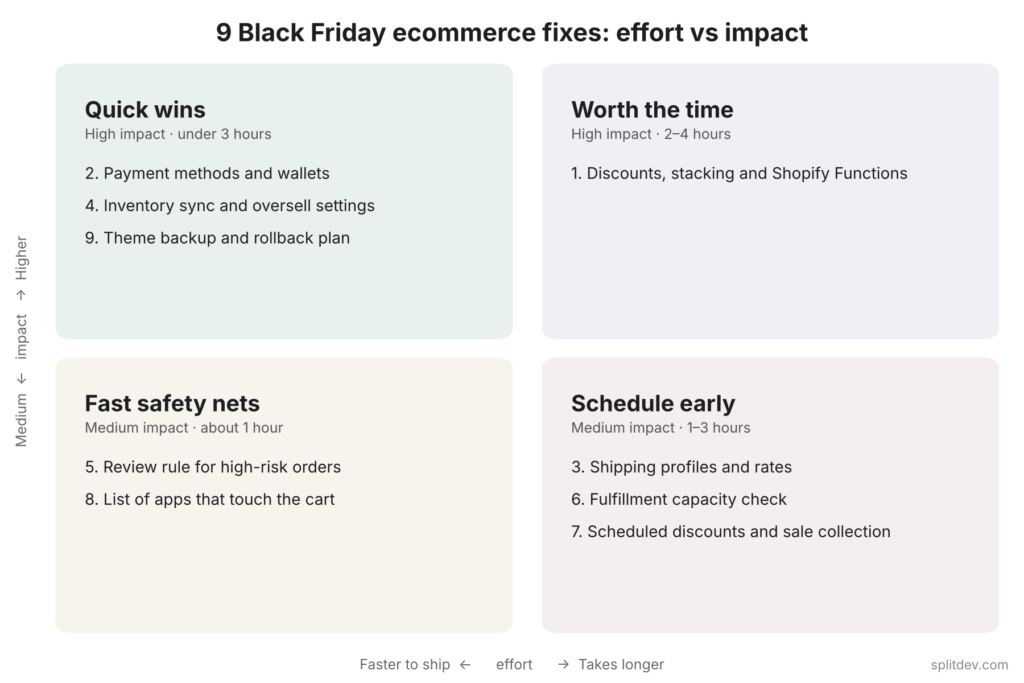
9 Black Friday Ecommerce Tips Ranked by Effort and Impact
Each fix lists how long it usually takes, who does it and what happens if you skip it. Fixes 1, 2, 4 and 9 protect revenue directly, so ship those even if nothing else gets done.
1. Test Every Discount, Stacking Rule and Shopify Function
Time: 2–4 hours · Who: owner and developer · Risk if skipped: high
Shopify Scripts stopped executing on June 30, 2026, according to the Shopify developer changelog. Any discount, shipping or payment logic that still depended on Scripts no longer runs. That logic now has to live in Shopify Functions, native automatic discounts or an app built on Functions.
Walk through every combination you plan to run: a percentage off with free shipping, BOGO with a spend threshold, automatic discounts stacked with codes, gift cards and Shop Pay. Place test orders and confirm the final price, the line-item discounts and the shipping total. Then check the combination settings on each discount, because one missing checkbox decides whether a code stacks with an automatic offer or replaces it.
On a multi-store setup the risk multiplies. Meroda Cosmetics runs five Shopify Plus stores for different European markets, so a rule configured wrong in one admin has to be checked in every other store as well. Test each store separately.
2. Confirm Payment Methods, Wallets and Payment Rules
Time: 1–2 hours · Who: owner · Risk if skipped: high
Open Settings > Payments and confirm that Shop Pay, Apple Pay, Google Pay and PayPal are switched on for every market you sell to. Check any payment customization that hides or reorders methods, for example a rule that removes cash on delivery above a certain order value. Then place one real order per method and refund it.
Shop Pay deserves extra attention. Shopify reports that 32% of BFCM 2025 orders went through it, so a wallet that quietly fails for one market affects roughly one buyer in three there. If you sell in several currencies, check that local prices and rounding rules display as expected. International checkout was a core part of our work for Star Pro Combat, a combat sports brand selling in the US, UK and EU, which saw conversion in key markets grow 48%.
3. Review Shipping Profiles, Rates and Free Shipping Rules
Time: 1–2 hours · Who: owner or operations · Risk: medium
Go through Settings > Shipping and delivery zone by zone. Look for rates that no longer match carrier prices, products sitting in the wrong shipping profile and zones with no rate at all, which stop the order at checkout. If your sale includes free shipping, decide whether it runs as a shipping discount or as a free rate above a threshold, and make sure the two do not apply at once. Place a test order to each of your three biggest destinations.
4. Check Inventory Sync, Low-Stock Alerts and Oversell Settings
Time: 1–3 hours · Who: owner and operations · Risk if wrong: high
Confirm that stock syncs correctly from your warehouse or 3PL, and place one test order to watch the count update in both systems. Set low-stock thresholds with email or Slack alerts. Then decide for each key product whether Shopify should keep selling at zero (“Continue selling when out of stock”) or stop. Overselling a hero sale product brings refunds, angry emails and chargeback risk in the same week.
5. Set Up a Review Rule for High-Risk Orders
Time: 1 hour · Who: owner · Risk: medium
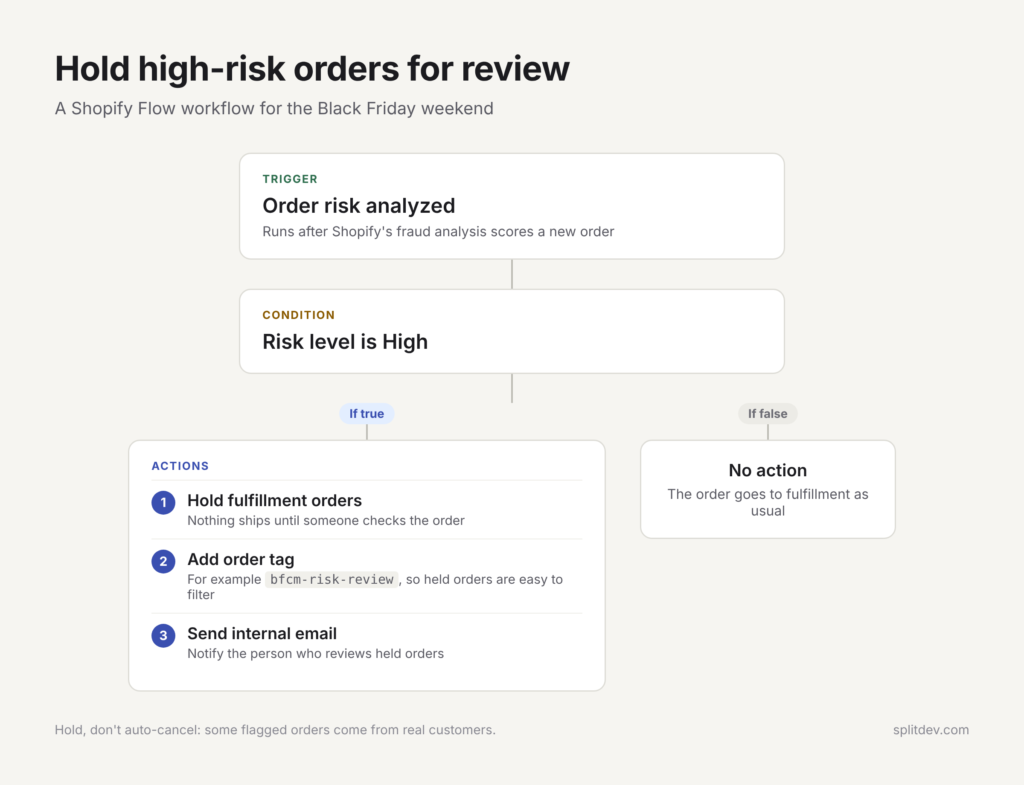
Fraud attempts rise with order volume, and nobody has time to read every risk score during the sale. Shopify Flow, a free app on the Basic plan and above, can catch orders that Shopify’s fraud analysis marks as high risk, hold their fulfillment, add a review tag and notify the person who checks them. Holding is safer than automatic cancellation, because some high-risk orders turn out to be genuine customers. Agree in advance who reviews the held orders and how often.
6. Get Fulfillment Ready for Three Times the Orders
Time: 1–2 hours · Who: operations · Risk: medium
Ask your 3PL or warehouse team three things: the daily order capacity they have confirmed for your account, the cutoff time for same-day dispatch and the backlog they expect on Monday after the weekend. Make sure packing materials and labels are stocked for the peak, not the average. In Shopify, tag orders that need special handling, such as gift messages or pre-orders, so they never sit in the general queue.
7. Schedule the Sale Instead of Launching It by Hand
Time: 2–3 hours · Who: owner · Risk: low
Set start and end dates on every discount, and check the time zone in your store settings, because a sale that starts at midnight in the wrong zone goes live hours early or late. Build the sale collection now and keep it unpublished until launch. Test any countdown timer against the real end time, and use a countdown only for a real deadline, because a timer that resets on every visit costs trust.
8. List Every App That Touches the Cart and Checkout
Time: 1 hour · Who: developer or technical owner · Risk: medium
Upsell widgets, bundle builders, loyalty programs and discount apps can all change the cart, and two of them changing it at once is a common source of wrong totals. Write down every app that edits cart contents, prices or checkout, what it does, and how to switch it off quickly. Bookmark the status page of each app vendor. On Black Friday, that list turns a two-hour investigation into a five-minute decision.
9. Duplicate the Live Theme and Write a Rollback Plan
Time: 30–60 minutes · Who: developer or technical owner · Risk: low, this step reduces risk
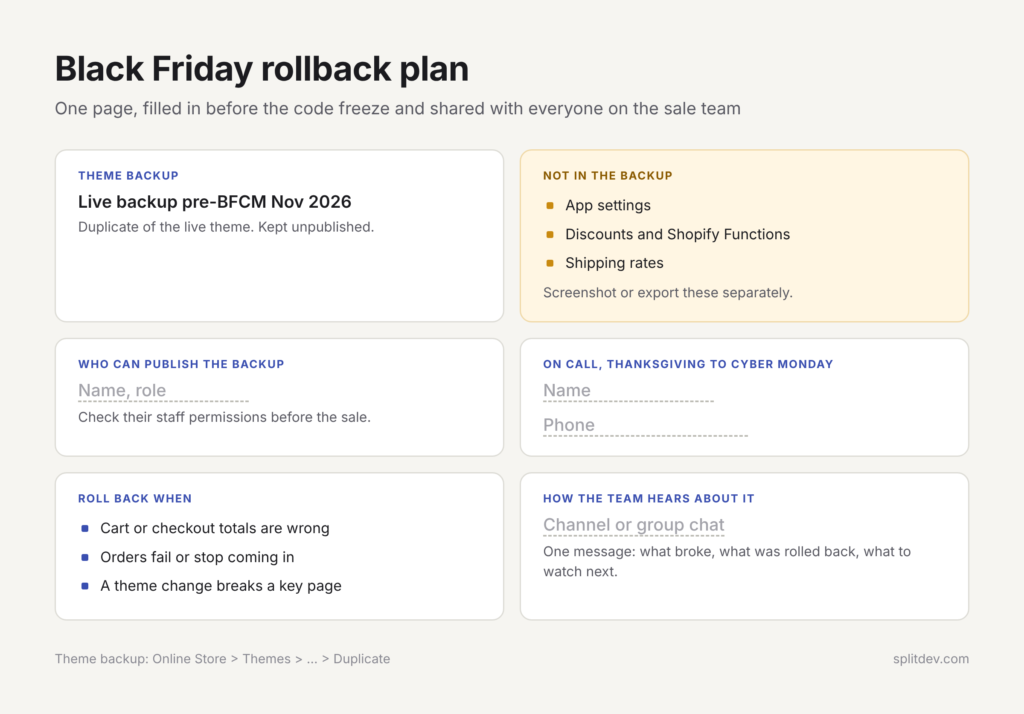
In Online Store > Themes, duplicate the live theme and give the copy a clear name such as “Live backup pre-BFCM Nov 2026”. Leave it unpublished. A theme backup does not include app settings, discounts, Functions or shipping rates, so screenshot or export those separately. Then write a one-page rollback plan covering who can publish the backup, in which situations, and how the team hears about it. Name the person on call from Thanksgiving through Cyber Monday, check that they have the staff permissions they need and share their phone number with everyone involved.
A 10-Day Schedule to Ship All Nine
Ten working days starting Monday, November 9 take you to Friday, November 20.
Day
Focus
Who
Approx. time
1 (Nov 9)
Discount and Functions testing (fix 1)
Owner and developer
2–4 h
2 (Nov 10)
Payment methods and test orders (fix 2)
Owner
1–2 h
3 (Nov 11)
Shipping profiles and rates (fix 3)
Owner or operations
1–2 h
4 (Nov 12)
Inventory sync, alerts, oversell policy (fix 4)
Owner and operations
1–3 h
5 (Nov 13)
High-risk order workflow (fix 5)
Owner
1 h
6 (Nov 16)
Fulfillment capacity check (fix 6)
Operations
1–2 h
7 (Nov 17)
Scheduled discounts and sale collection (fix 7)
Owner
2–3 h
8 (Nov 18)
App list, theme backup, rollback plan (fixes 8 and 9)
Developer
1.5–2 h
9 (Nov 19)
Full re-test with real orders: discounts, payments, shipping
Whole team
2–3 h
10 (Nov 20)
Final review and on-call handover
Owner
1 h
If some items are already done, pull the remaining ones forward and keep days 9 and 10 for the re-test.
What This Work Looks Like on Real Stores
Meroda Cosmetics. We support Meroda’s five Shopify Plus stores and delivered a Shopify 2.0 redesign with cart and checkout improvements and an interface adapted to each market. Across the store group, Meroda’s average order value grew 22% and abandoned carts fell 31%.
Star Pro Combat. We designed and built the brand’s store from scratch, with multilingual and multi-currency setup for the US, UK and EU and an international checkout. Star Pro Combat saw conversion in its key markets grow 48% and revenue per visitor grow 63%.
Until November 9, 2026, our store audit before Black Friday costs $199 instead of $350. Along with the storefront review, we look at your discount setup and checkout and send a prioritized list of fixes your team can ship in time.
FAQ
Is three weeks enough time to fix an online store before Black Friday?
Yes, for targeted fixes. Three weeks is enough to test discounts, confirm payment methods, review shipping rates, set inventory alerts and prepare a rollback plan, although it is too short for a redesign or a platform change. An owner and a developer working together can usually finish these back-office checks in about ten working days.
Do Shopify Scripts still work for Black Friday discounts?
No. Shopify Scripts stopped executing on June 30, 2026, according to Shopify’s developer changelog. Custom discount, shipping and payment logic now has to run through Shopify Functions, native automatic discounts or an app built on Functions. Test every discount combination you plan to run, including codes stacked with automatic discounts, with real test orders before the sale starts.
How can I stop fraudulent orders during a Black Friday sale?
Use Shopify’s built-in fraud analysis together with a Shopify Flow workflow that holds fulfillment on high-risk orders and notifies a team member. Flow is free on the Basic plan and above. Review held orders at fixed times each day of the sale, and hold rather than auto-cancel, since some flagged orders come from real customers.
Should I install new apps right before Black Friday?
Only when the app is essential, already tested on your store and covered by your rollback plan. Every new app adds scripts, possible conflicts with apps that already change the cart and one more thing that can break at peak traffic. In the last weeks before a big sale, documenting the apps you already run usually does more for stability than adding new ones.